Obby Tower Parkour Climb
Reviews
Description
Game Introduction
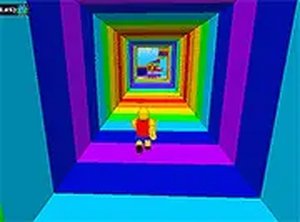
Obby Tower: Parkour Climb is an exciting 3D obstacle course game that brings the thrill of parkour to your browser. With its vibrant Roblox-like graphics, this game offers a fun and engaging experience for players of all ages. You can choose to play solo, testing your agility and timing as you climb through increasingly challenging towers, or invite a friend for a head-to-head race in the 2-player mode. The game is designed to be accessible and family-friendly, with no violence or inappropriate content. Simply jump, dodge, and overcome obstacles to reach the top. Whether you are a casual gamer or a parkour enthusiast, Obby Tower: Parkour Climb provides endless entertainment. Best of all, it is completely free to play on your browser, with full-screen support for an immersive experience.
How to Play
To play Obby Tower: Parkour Climb, use your keyboard and mouse. In solo mode, use the arrow keys or WASD to move, and the spacebar to jump. Time your jumps carefully to avoid falling off platforms or hitting obstacles. In 2-player mode, Player 1 uses WASD and spacebar, while Player 2 uses the arrow keys and spacebar. The goal is to reach the top of the tower first. Practice your timing and coordination to master the courses. The game runs smoothly in your browser with no downloads needed.
Game Features
Game features include free-to-play access, Roblox-like graphics, solo and 2-player modes, full-screen support, and a family-friendly environment. The controls are simple to learn, making it easy for new players to start quickly. The courses increase in difficulty, providing a steady challenge for all skill levels.
Tips for Success
To succeed in Obby Tower: Parkour Climb, focus on timing your jumps precisely. Take a moment to observe each obstacle before attempting to cross it. Practice regularly to improve your coordination and reaction speed. In 2-player mode, learn to balance speed with caution, as rushing can lead to falls. Use the full-screen mode for better visibility and fewer distractions. Most importantly, stay patient and persistent—each attempt helps you learn the course layout and improve your performance.
Compatibility
This H5 game runs smoothly on: • Desktop computers (Windows / Mac) • Mobile phones (iPhone / Android) • Tablets (iPad / Android) 🌐 Best experienced with Chrome, Safari, or Edge
Faq
Related Picks

Ascent Idle RPG Adventure
Clean design and smooth progression. Great for relaxing breaks and strategic planning.

Chamber Maze Puzzle Adventure
Clever puzzles and smooth controls. Each level feels new and keeps you thinking.
Fireside Kindness Community Game
A calming game that promotes generosity. Simple controls and a positive message make it enjoyable for all ages.
Funny Obbys Adventure Puzzle Game
Clean design and smooth gameplay. Great for short breaks. Progressive levels keep it engaging.
Half Heart Puzzle Adventure
Smart teleportation puzzles with real stakes. Clean design and smooth gameplay. Great for short breaks.
Eggstreme Eggscape Arcade Adventure
Clean design and smooth gameplay. Great for short breaks or longer sessions.

Alvin and the Chipmunks Skateboard Adventure
Simple one-tap controls and bright graphics. A fun reflex game for short breaks.
Rabbit Run Adventure
Charming rabbit character and smooth controls. Great for quick, fun breaks.