Mini Golf Forever Arcade Sports
Reviews
Description
Game Introduction
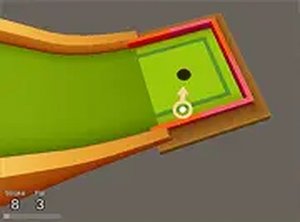
Mini Golf Forever Arcade Sports is a free 3D golf game that runs directly in your web browser. Players take on the role of a golfer navigating a series of creative and tricky levels. The core objective is simple: aim your ball in the desired direction and choose the right amount of force to get it to the next stage. Using too much power may cause the ball to fall off the course, requiring a restart. This game offers a relaxing yet challenging experience for players of all ages, with smooth 3D graphics and intuitive controls. Whether you are a golf enthusiast or just looking for a fun pastime, Mini Golf Forever provides endless entertainment without any complicated rules. It is completely free to play, making it easy to jump in and start playing.
How to Play
Playing Mini Golf Forever Arcade Sports is straightforward. Players typically use a mouse to aim the ball in the desired direction. Then, adjust the force by clicking and dragging—the longer you hold, the more power you apply. Release to hit the ball. The goal is to guide the ball through each level, avoiding obstacles and keeping it on the course. If too much force is applied, the ball may fall off, and the level must be restarted. The game is designed for desktop play, so a mouse is recommended. Players can also switch to full screen mode for a more immersive view. Take time to practice aim and power control to master each hole and progress.
Game Features
Mini Golf Forever Arcade Sports includes fun 3D graphics that create an engaging visual experience. Simple mouse controls make it easy for anyone to pick up and play. The game offers a variety of challenging levels that test accuracy and power management. It is completely free to play with no downloads required, and full screen support allows for a more immersive experience. As an online arcade game, it provides quick and accessible entertainment for players of all skill levels.
Tips for Success
To succeed in Mini Golf Forever Arcade Sports, focus on mastering aim and power control. Start each hole by carefully observing the layout and identifying potential obstacles. Use gentle force to keep the ball on the course, as excessive power can cause it to fall off. Practice regularly to improve accuracy and learn the nuances of each level. Take advantage of full screen mode to better see the course and plan shots. Patience and precision are key to progressing through the game.
Compatibility
Faq
Related Picks

Airport Security 3D: Object Search
A fun object search game that tests your observation skills with an X-ray scanner. Great for quick browser play.

Space Craft Builder: Cosmic Voyage
A delightful space builder that encourages creativity and exploration in a vibrant, family-friendly universe.

Ranch Defense: Magic and Strategy Game
A fun family-friendly game that combines magic and strategy to protect your ranch from monsters.

Nubik: Realm Guardian
A fun arcade defense game with creative power-up crafting and smooth controls for all ages.

Fish Growth Challenge Casual Game
A fun, casual multiplayer fish growth game with simple controls and vibrant underwater visuals. Great for all ages.
Puffy Ball Collector: Reflex Game
A fun, free reflex game with simple controls and colorful graphics. Perfect for quick play sessions.

DustFall 22 Wave Survival Challenge
DustFall 22 Wave Survival Challenge offers intense, family-friendly action with strategic wave defense and fun multiplayer.

Deer Explorer: Open World Simulator
A delightful open-world simulator with charming deer antics and endless exploration fun for all ages.