Christmas Quest Platformer Adventure

Reviews
Description
Game Introduction
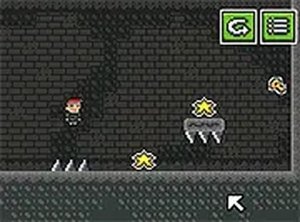
Christmas Quest Platformer Adventure is a festive side-scrolling game that combines classic platforming with a lighthearted story. Set during the holiday season, players control Steve on a mission to retrieve his Christmas present. The game features charming pixel art graphics and a cheerful Christmas theme, creating a welcoming atmosphere suitable for players of all ages. The adventure unfolds through interactive cutscenes that advance the narrative, blending gameplay with storytelling. The core objective is to navigate through a series of levels, overcoming obstacles and hazards, to reach the present at the end. This game offers a family-friendly experience that captures the spirit of the holidays while providing engaging platforming challenges.
How to Play
Players guide Steve through side-scrolling levels using keyboard and mouse on a desktop browser. The main actions involve moving left and right, jumping over gaps and obstacles, and avoiding hazards along the path. Tools can be used to interact with enemies that block progress. Interactive cutscenes appear during the game, where on-screen prompts allow players to advance the story. The goal is to navigate each level and reach the Christmas present at the end. Full screen mode and level restart options are available to enhance the experience.
Game Features
The game includes a festive Christmas theme with pixel art graphics. Side-scrolling platforming action requires jumping and timing. Interactive movie-style cutscenes tell a story as players progress. Players may encounter enemies that can be overcome using various tools. Full screen mode provides an immersive experience, and a level restart option allows players to retry sections. The game is designed for desktop browsers and is suitable for all ages.
Tips for Success
Pay attention to the interactive cutscenes as they may provide hints about upcoming obstacles. Practice jumping and timing to clear gaps safely. Use the right tool for each enemy encounter. Explore each level thoroughly to avoid missing items or shortcuts. If you get stuck, use the restart option to try a different approach. Take breaks to keep the experience enjoyable.
Compatibility
Faq
Related Picks

Head Ball Challenge Action Game
A fun and fast-paced football game that is perfect for quick matches with friends or solo career play.

Nubik: Defense of the Realm
Fun arcade defense with creative power-up crafting. Perfect for family play.

Time Keeper Adventure Action Game
Time Keeper Adventure Action Game offers strategic combat and precise platforming in a fantasy setting. It is engaging and free.

Deer Adventure: Open World Simulator
A delightful open-world simulator where you play a cheerful deer, offering humorous interactions and endless exploration in a safe, cartoonish environment.

Survival Challenge: Post-Apocalyptic World
A compelling survival game that tests your resourcefulness and strategic thinking in a challenging world.

DustFall Wave Survival
A fresh monster-wave survival on a classic map. Great for FPS fans.

Yummy Churros Ice Cream 2
A sweet and fun game for creating your own churros ice cream with ease!
Puzzle Quest Escape Adventure
A fun and simple puzzle game with clear goals and gradual difficulty. Great for quick breaks.