Community Health Strategy Simulator
Reviews
Description
Game Introduction
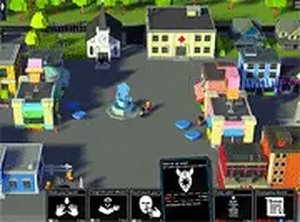
Community Health Strategy Simulator places you in the role of a town mayor during a public health crisis. Your core objective is to manage the spread of a virus by guiding residents through daily interactions. The game turns real-world health concepts into a thoughtful strategy experience, focusing on education and prevention rather than action or conflict. It is designed to be a calm, family-friendly simulation that highlights how communities can respond to outbreaks through careful planning and cooperation. The game provides a low-stress environment where players learn about public health measures and their effects on a population. By making strategic decisions, you can see how different approaches influence the outcome of the crisis. This simulation emphasizes awareness and thoughtful action, making it suitable for players of all ages who are interested in strategy and community management.
How to Play
Players use their mouse and keyboard to issue commands to the town's citizens. You can instruct residents to adopt protective measures such as washing hands, wearing masks, or maintaining distance from others. The game provides real-time feedback as the infection spreads, allowing you to observe the effects of your decisions. You must adjust your orders based on new outbreaks and the behavior of the population. The game is best played on a desktop computer and offers a full-screen mode for a clearer view of the simulation. The interface is straightforward, making it easy to give instructions and monitor the situation as it evolves.
Game Features
This game combines educational content with strategic decision-making. It offers real-time feedback on the spread of infection, allowing you to see the impact of your choices immediately. The content is family-friendly and focuses on public health education without any violent or disturbing elements. It is free to play directly in a web browser with no downloads required. A full-screen mode is available to enhance the immersive experience. The simulation encourages careful planning and awareness in a calm, low-stress environment. The game is designed to be accessible to a wide audience, making it a good choice for both casual and more dedicated strategy players.
Tips for Success
Pay close attention to the real-time feedback the game provides. If you notice a sudden increase in infections, quickly adjust your instructions to reinforce hygiene and distancing. Prioritize educating the most vulnerable residents first. Experiment with different combinations of commands to see which strategies work best in various scenarios. Remember that the goal is to reduce infections and save lives, so focus on prevention rather than reaction. Taking a calm, methodical approach will help you manage the outbreak effectively.
Compatibility
Faq
Related Picks

Triple Stack Card Challenge
A fun, family-friendly card game with a clever three-stack mechanic that adds depth to classic gameplay.

Kingdom Guardian: Tower Defense
A fun tower defense game with strategic depth and direct king control. Great for casual play.

Nubik: Defense of the Realm
Fun arcade defense with creative power-up crafting. Perfect for family play.

Panda Shop Management Adventure
A charming panda-themed management game blending farming and shop simulation for all ages.

Stellar Enterprise Idle Strategy
A relaxing idle strategy game that rewards patience and smart resource management. Perfect for space enthusiasts.

Idle Quest Adventure
Idle Quest Adventure offers relaxing progression with skill learning and upgrades. Perfect for casual players.
Plumber Care Medical Simulation
A heartwarming blend of gentle medical care and creative dress-up that is safe and fun for all ages.

Winter Siege Castle Defense
A strategic castle defense game with real-time tactics and resource management. Great for fans of strategy games.