Solar System Space Explorer
Reviews
Description
Game Introduction
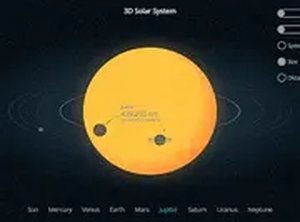
Solar System Space Explorer is an interactive educational simulation that helps users learn about the planets orbiting our sun. The tool presents the solar system in a full three-dimensional view, with the option to switch to a two-dimensional layout for a different perspective. Users can adjust the speed at which planets rotate around the sun, compare the sizes of planets side by side, and observe the distances between them. This makes it a practical resource for understanding the scale and motion of our cosmic neighborhood. The simulation works directly in a web browser without any downloads or installations. It is suitable for children, students, and anyone curious about astronomy. The interface is intuitive and encourages exploration at the user's own pace. By interacting with the simulation, users can develop a clearer mental model of how planets move and relate to one another in space.
How to Play
To begin, select either the 3D or 2D view from the main screen. Use the settings menu to increase or decrease the speed of planetary rotation around the sun. A side view option allows you to compare the sizes and distances of planets more easily. Navigation is simple: click or tap on any planet to learn more about it. The simulation runs smoothly on both desktop and mobile devices, and you can enable full screen for a more immersive experience. There are no complex controls or timers, so you can explore at your own pace. The tool is designed to be accessible to users of all ages and experience levels.
Game Features
Features include the ability to switch between 3D and 2D views for different learning perspectives. Users can compare planet sizes and distances using a side view. The rotation speed is adjustable, allowing you to slow down or speed up the simulation. The tool is fully playable on mobile devices and supports full-screen mode for an enhanced experience. All content is presented in a clear, educational manner without any distracting elements. The simulation is free to use and does not require any downloads or registration.
Tips for Success
To get the most out of this educational tool, start by exploring each planet individually to learn its unique characteristics. Use the speed control to observe orbital patterns at a comfortable pace. Compare planets side by side to better understand their relative sizes and distances. Regular exploration will help you build a mental map of the solar system. The more you interact with the simulation, the more intuitive space concepts become.
✅ Compatibility & Testing
Faq
Related Picks

Airport Security 3D: Object Search
A fun object search game that tests your observation skills with an X-ray scanner. Great for quick browser play.
Space Craft Builder: Cosmic Voyage
A delightful space builder that encourages creativity and exploration in a vibrant, family-friendly universe.

Survival Challenge: Resilient World
A tense survival game that rewards careful planning and adaptability in a dynamic, challenging world.
Animal Puzzle Fun
A safe, fun, and educational puzzle game for kids with colorful animals and no time pressure.
Donut Shop Manager
A delightful donut shop management game with simple controls and colorful graphics that is fun for all ages.

Space Enterprise Idle Management
A relaxing space management game that rewards strategic planning and consistent play with satisfying incremental growth.
Happy Town City Builder
A relaxing and family-friendly city builder that lets you create a thriving community at your own pace.
Ice Cream Shop Management Simulator
A delightful management sim that blends creative recipe mixing with smart business strategy for all ages.