Run and Freeze Arcade Challenge
Reviews
Description
Game Introduction
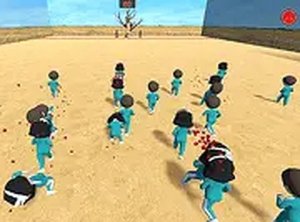
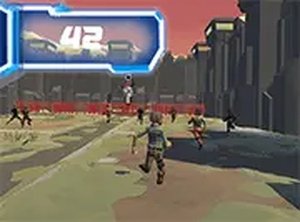
Run and Freeze Arcade Challenge is a fun and playful running game that brings a twist to classic endless runner mechanics. Inspired by popular challenge concepts, this game asks you to move your character forward while a cute doll sings a funny song. The magic happens when you play with sound on, as the music becomes your guide. Designed for desktop play, it runs directly in your browser with no downloads needed. Each round offers a new challenge as the doll's song speeds up, testing your timing and concentration. The vibrant 3D world and cheerful music create an engaging atmosphere for players of all ages. Whether you have a few minutes or want a longer session, this game provides endless entertainment. It is completely free and family-safe, making it a great choice for quick breaks or casual gaming.
How to Play
Use your keyboard or mouse on a desktop computer to control your character. Start the game and listen carefully to the doll's song. When the doll sings, you can move forward. When the song stops, you must freeze immediately. The goal is to reach the finish line without being caught. The game is easy to learn but requires good timing and focus. Play in full screen mode for a more immersive experience. Each round becomes more challenging, so practice your moves and enjoy the playful music. There are no complicated controls, just simple movement and pause actions. Perfect for players who enjoy quick reflex challenges.
Game Features
Fun music and a cute doll character. Colorful 3D graphics that are easy on the eyes. Free to play with no hidden costs. Runs directly in your browser on desktop. Simple controls suitable for all ages. Increasing difficulty keeps each round fresh.
Tips for Success
Listen carefully to the song's rhythm to anticipate when the music will stop. Practice staying completely still during freeze moments to avoid being caught. Use short, quick movements rather than long runs to maintain better control. Play with sound on for the best experience, as the music is your primary guide. Take short breaks between rounds to keep your focus sharp. As the speed increases, stay calm and rely on your timing rather than rushing.
Compatibility
Faq
Related Picks

Fish Match Arcade Game
A delightful matching game with colorful graphics and simple controls. Perfect for quick, relaxing play.

Mr Bean Funny Face Creator
A fun, creative game for all ages. Easy to play and share silly faces instantly.
Creative World Sandbox Builder
A relaxing sandbox game that encourages creativity through building, crafting, and exploring with friends.
Animania! Online Rhythm Game
A charming browser rhythm game with anime visuals, catchy music, and simple controls. Great for quick fun.

Rhythm Showdown: Musical Matchup
A cheerful rhythm game with bright visuals and adjustable difficulty. Perfect for quick, fun musical duels.
FNF Rhythm Showdown Game
Fun rhythm game with catchy tunes and simple controls. Great for quick play.
Space Squid Arcade Adventure
A fun, family-friendly arcade game with progressive obstacles and many unlockable characters.

Pause Timing World Explorer
A simple, fun timing game that creates unique surprises with every pause. Perfect for quick play.